
Keep up with our latest updates
WithWine News

Read & Watch
Plain Text vs. HTML Emails: Which Is Better?

Shared by WithWine
• May 08, 2024
From Hubspot's Blog:
https://blog.hubspot.com/marketing/plain-text-vs-html-emails-data
Plain Text vs. HTML Emails: Which Is Better? [New Data]
Updated: June 11, 2021
Published: July 27, 2015
In the world of email marketing, opens and clicks are everything, which means email marketers are always testing ways to improve these metrics. We'll tweak subject lines, calls-to-action, images, headers, layout, link positioning, copy, length, tone, content ... the list goes on and on.
Through all of this testing, there's one hard truth we've discovered: Aside from proper list segmentation, nothing boosts opens and clicks as well as an old school, plain-text email.
While the plain-text emails we created had some formatting capabilities (hyperlinks, tracking pixels, etc.), they were as close to plain-text as we could while maintaining the ability to track opens and clicks for testing purposes.
With that said, here's how we came to that conclusion.
Beyond Deliverability
The (relatively) old debate of plain-text vs. HTML is mostly centered around email deliverability. We won't be covering all of the deliverability best practices in this article, but it is important to have some context around that metric.
Having an HTML email does not hurt your deliverability as long as you have two things: a properly coded HTML email and a plain-text version.
1) The HTML email needs to be properly coded.
If there are broken tags in your HTML, the email provider and users can mark it as spam. That'll hurt deliverability -- not just for that email, but also for any emails coming from that particular email address in the future.
2) The email should also contain a plain-text version.
Most email marketing tools will let you easily create plain-text versions within their email editor, so take those five extra minutes to create and optimize the plain-text version of your email. Otherwise, email providers such as Gmail or Outlook might think your email is dodgy -- they expect legitimate companies to follow this basic best practice.
If your emails follow the deliverability guidelines above, your HTML and plain-text should have the same deliverability metrics.
So if you're following the best practices above, which type of email actually performs better once it's in someone's inbox?
People Say They Prefer HTML Emails
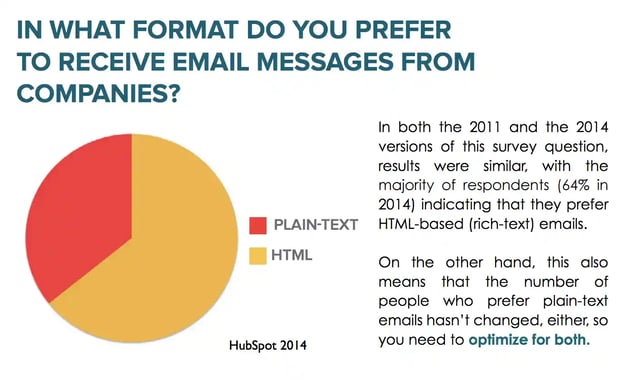
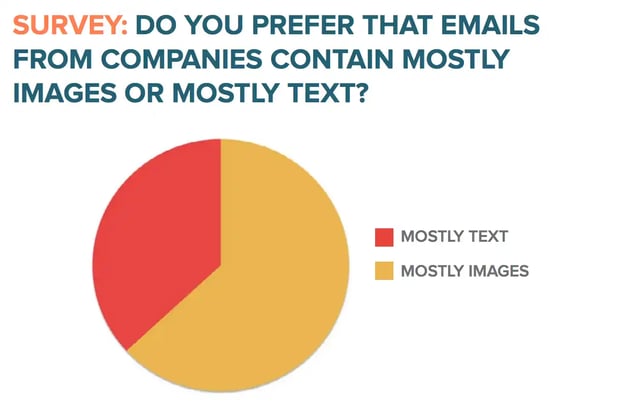
In a 2014 survey, we asked over a thousand professionals whether they preferred HTML-based or text-based emails, and whether they preferred emails that consisted of mostly text or mostly images. Nearly 2/3 of the respondents said they preferred HTML and image-based emails.
Great, we thought. If people wanted visuals, we'd give them visuals!
So we decided to experiment with varying degrees of HTML-richness -- plain HTML templates, snazzy and sleek HTML templates, beautiful headers, different sized and positioned images, various call-to-action buttons, and even GIFs -- to see which would have the best result.
... But They Actually Prefer Plain-Text
In every single A/B test, the simpler-designed email won. The emails with fewer HTML elements won with statistical significance.
Ouch.
Every other marketing channel is moving towards incorporating visuals and seemingly getting positive results. Why were emails performing worse when we attempted to make them more visual appealing?
HTML emails reduce open rates.
One thing that we noticed was that our HTML and plain-text emails were both receiving the same deliverability rate. So if they were getting delivered at the same rate, how were HTML emails underperforming?
To understand the full scope of what happened, we decided to A/B test our email sends. We tested various segments of our database in multiple regions to get a better picture of HTML vs. plain-text emails.
The results confirmed what we assumed: HTML emails decreased open rates.What was interesting, however, was that not only were HTML emails receiving lower open rates than their plain-text counterparts, the more HTML-rich an email was, the lower its open rate.
Here are some of the A/B test results we found:
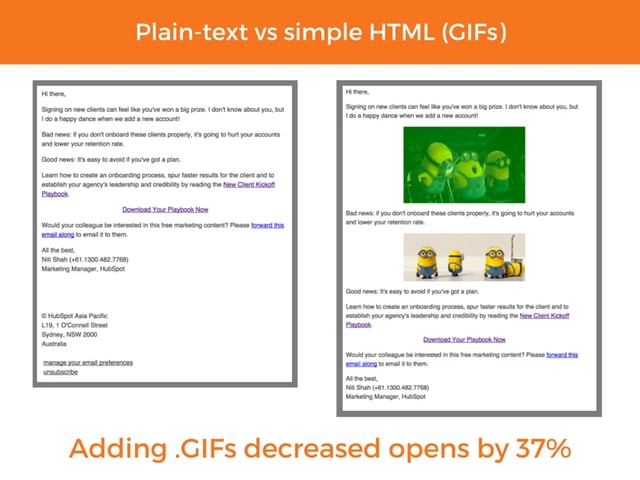
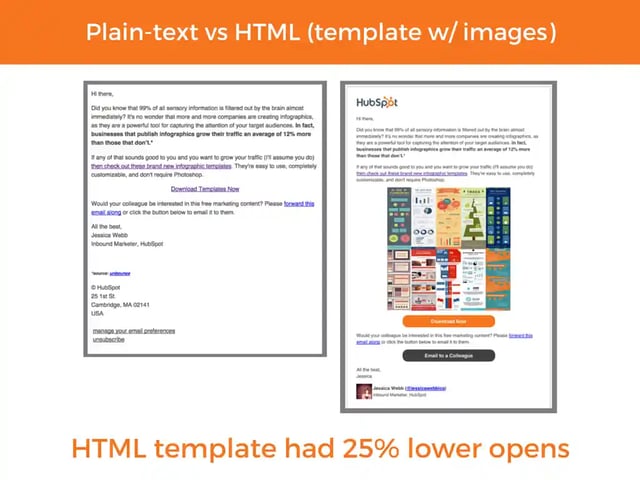
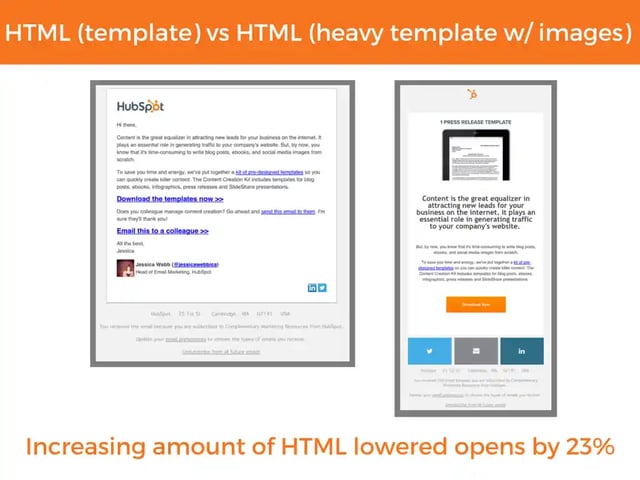
While these (and at least 10 more) tests vary in the percentage opens were lowered, the conclusion we came to was that simpler HTML emails had better open rates than HTML-rich emails, and that plain-text emails performed best of all.
Why?
We figured it had to do with the concept of deliverability. Just because something says it's been delivered doesn't mean it's actually in a noticeable place of someone's inbox.
Email services are increasingly filtering emails (especially commercial ones) to provide a better experience for the user. An example of this is Gmail's promotions tab. It automatically filters what it deems "commercial" emails out of the main inbox unless the user changes the settings.
So the simple explanation is that image tags and HTML-rich templates seem to be getting flagged by email providers as commercial email, which means they get filtered out of a recipient's main inbox. (And thus, people can't open it.)
HTML emails reduce clickthrough rates.
But open rates are just one part of the picture. Even if open rates decreased with HTML emails, most marketers assumed HTML emails would convert better because they appear well designed.
For example, shouldn't an email with an image of the ebook being promoted do better than an email with no visualization of the offer? Wouldn't just a plain email be boring, and not help explain the offer? Aren't humans wired to be attracted to beautiful design?
Unfortunately, this principle doesn't apply to email.
And the reason is simple: Email, unlike other marketing channels, is perceived as a 1-to-1 interaction.
Think about how you email colleagues and friends: Do you usually add images or use well-designed templates? Probably not, and neither does your audience. They're used to using email to communicate in a personal way, so emails from companies that look more personal will resonate more.
To better understand the impact of plain-text vs. HTML emails, we looked at the effect on the click rate (clicks/delivered) which is influenced by open rates, and clickthrough rates (clicks/opens) which isolate clicks from the variable of opens.
For the click rate, we dove into data from over half a billion marketing emails sent from HubSpot customers. These customers vary in type of business, and have different segments, list sizes, and list compositions.
What we found was that even a single image reduced the click rate:
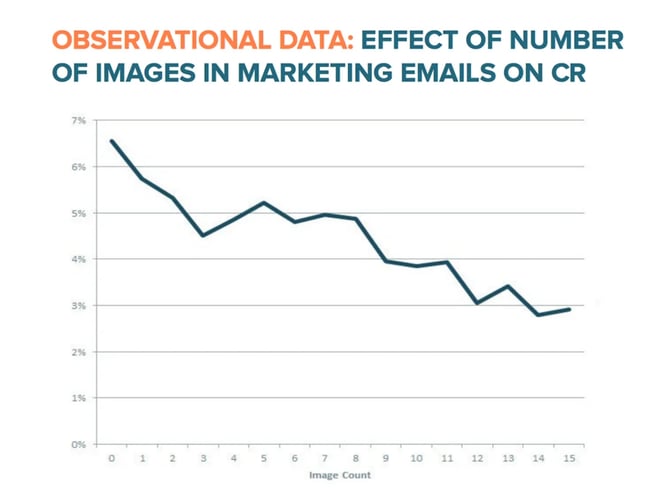
This data above is of course correlated to open rates -- but what other factors might be contributing to the decline in click rates? In the data above, it's clear that after the HTML threshold is crossed, click rates continue to decrease, which means it's not just the open rate affecting the click rates
To see if the clickthrough rate (clicks/opened) were affected, we looked to our A/B tests once again. For the emails in the section above as well as in the others we have tested, the plainer variation won with statistical significance.
- For the plain-text vs. .GIF image test, the .GIF version had a 2.3% lower clickthrough rate. This, combined with the lower open rate, meant the plain-text version got 42% more clicks.
- For the plain-text vs. HTML template with images test, the HTML email version had a 21% lower clickthrough rate, and combined with the open rate the email had 51% fewer clicks.
- For the simple HTML template vs. HTML-heavy template, the simpler email had a 5.3% higher clickthrough rate, and combined with the higher open rate, resulted in getting 30% more clicks.
It would seem that better design or even images did not improve the clickthrough rate -- in fact, HTML consistently had a lower clickthrough rate. When combined with the lower open rates, this can turn into a double-whammy for email conversions.
What This Means for Email Marketers
Although people say they prefer HTML-based and image-based emails, in reality, simpler emails perform best -- and plain-text emails perform best of all.
In most instances, lower opens and clicks are due to several factors:
- Filters set up by email providers that divert commercial emails from users' main inboxes.
- Email client limitations. For example, Gmail will not automatically show images from unknown senders.
- User preference for digestible formatting. Plain text might be perceived as less of a time commitment to read, or perhaps people really don't care for design in email.
Ultimately, in email, less is more.
This can be a tough pill for marketers to swallow (myself included) because we're naturally driven to be creative. But data repeatedly shows plain-text email wins, so it's up to us to decide whether or not we want to make the switch.
Like with all cases, there may be exceptions. For example, ecommerce companies may have completely different results because users expect only HTML-rich emails with visuals of products. So before you make any final decisions, it's important to test your own emails.
It's not all bad though. Being limited to plain-text forces marketers to get creative with the basics -- subject line, copy, positioning, link placement -- to achieve the desired result. Sometimes "old-school," well-written copy is all you need to get the job done.
Nice to Know
PhotoRoom app
Shared by WithWine
• May 08, 2024
We found this app over the weekend and thought it was worth sharing with you all given the campaigns you may be doing for Black Friday and Christmas:
If you want a product photo quickly but haven't got anything professional sorted out... this could be a good "better than nothing" solution.
Hope it helps 😊

Product update
v2 Wordpress Shopping Cart and Integrating Google Analytics GA4
Shared by WithWine
• May 08, 2024
A couple of weeks ago we released Version 2 of our Wordpress Shopping Cart with updated styling, toast notifications, and loads from the side of the browser instead of taking over the whole window.
Part II of that project involved a bunch of work to enable improved tracking of user events on your website; for example: Add to Cart, Checkout, Conversion Success, etc. This was released last night.
Both implementations will require your Wordpress Developer.
For a sample of the Version 2 Shopping Cart please visit https://dandelionvineyards.com.au.

Currently, you can use the following JavaScript inside the Wordpress theme file's header.php to enable the V2 cart. This will be supported through plugin options in a future version.
<script> window.WITHWINE_CART_VERSION === 2; </script>You can edit this file by going to Appearance > Theme Editor > header.php.
For a sample script for GA4 analytics please visit: https://webdocs.withwine.com/docs/websites/widgets/analytics-ga4-example and it's worth noting the script can be customised for your own purposes.
If your developer requires assistance from us to implement either of these new capabilities, please don't hesitate to reach out to us via the chat support 😊
Improvement
Club member notification emails
Shared by WithWine
• May 08, 2024
We've added a new email notification when you get a new club member.
To receive these emails click on the green + beside your name in the top left and select Account Preferences:

Then switch on the notification emails you'd like to receive:


Improvement
wwPOS on Apple Computers
Shared by WithWine
• May 08, 2024
A couple of little benefits for customers using Apple computers:
wwPOS and wwKIOSK both now work on Apple computers with M-series chipsets.
The app can be made to run in fullscreen mode and obviously it works great with a keyboard and mouse.


In case you weren't aware, most iPads are now compatible with external bluetooth keyboards and mice, or of course one of Apple's Magic Keyboards (which - depending on the model - also have an integrated trackpad):

Also, with the latest release of MacOS (Sonoma), you can now turn a website into a desktop app, which is handy if you're using a particular website (like WithWine.com) frequently:

Bug fix
Alpha-numeric Customer Numbers and some small bug fixes
Shared by WithWine
• May 08, 2024
Previously, Customer Numbers could only contain numerals - now they can be alpha-numeric. We have also added Customer Numbers to CSV exports.
We've encoded CSV downloads as UTF8 BOM so that excel opens them as UTF8 encoded so that it can read complex characters.
The Create New Product button within the Variations section of a Bottle's setup page was incorrectly creating the Variation as an "Other Product" instead of a Bottle. This has now been fixed.
On our EzyWine exports:
- We fixed small rounding errors due to transaction fee tax being excluded
- We fixed large rounding errors due to refunds not including the "R" suffix (both group by day which were being truncated and by order which wasn't including them)
- When a transaction type includes credit, we no longer render it as a SPLIT transaction unless its the only transactionType since credit is included as a line item anyway
- Ensure mix discounts on line items are included since mix totals are no longer stored on the mix itself

Improvement
Bug fix
A whole bunch of enhancements
Shared by WithWine
• May 08, 2024
⭐ Enhancements:
- Google address auto-complete added on all customer forms that require an address
- Link credit card auto-complete has been added on all customer forms that require a credit card
- Now you can have a Coupon trigger after a minimum Order $ value has been reached
- Now you can load individual components of the Detailed Summary rather than the whole report which can sometimes take a while to compile
- You can now edit Delay Dispatch dates
- You can now add Notes to an Order in the backend rather than just via POS
- We've added additional fields to the "Order Received" email that detail whether an Order is a Gift
🛠️ Bug Fixes:
- Additional Enterprise users can now be assigned tasks
- Invoice dates fixed up
- Some fixes around Rounding
💗 Shiny New Websites
- Dandelion Vineyards: https://dandelionvineyards.com.au using our new - much prettier - Version 2 Shopping Cart

- Lisa McGuigan's VAMP: https://www.lisamcguiganwines.com showcasing great design and use of animations.

More Details:
Google address auto-complete
We've wanted to add this for a long time but held out because Google didn't support addresses with Units / Apartments in Australia. Now they do... huzzah!
We've added them to pretty much every customer facing form that requires them to enter an address including Checkout and Club Signup, as well as the forms you fill in when you're completing orders over the phone or in the backend.
This is how it looks:


Link credit card auto-complete
We've added Link auto-complete to Checkout and Club Signup forms which can increase conversion rates by up to 7%.
If a customer is signed in on your website but hasn't added a credit card to their account yet, the Link icon will appear which will let them add their credit card number via a text message verification rather than going off to find their card and manually type it in.
This is what it looks like:

Minimum order value Coupons
Now you can have a Coupon trigger based on a customer's minimum spend rather than just minimum bottle quantity.

So if you wanted to apply a % discount or a $ discount or Free Shipping for orders above $500, you can.
What's even cooler is that you can set up this parameter alongside a minimum bottle quantity: i.e. if the order is above $500 and 12 bottles or more.
Shout out to Henschke for this enhancement!
While we're talking Coupons, did you know with our Advanced features you can also say "I only want this Coupon to work via POS and only for these people"?
If you're not across what Coupons can do now (or anything else in the platform for that matter) reach out to us and we can make a time to run you through all the features available to you 😊
Detailed Summary enhancements
The Detailed Summary provides a wealth of information at the click of the button.
With a single click, WithWine gets every Order, Channel, Staff Member, Product, Payment Type, Customer Tag, Coupon, and more... and stitches it all together in a neat summary of what's happening in your business and how things have gone up or down year-on-year.
After seeing our Detailed Summary for the first time, the head of marketing of a very large wine business once told us "I used to have to get someone to spend 8 hours to collate all that information for me! You can do it with a single click!"
For most, that click is followed by a few seconds for the system to crunch the data, but for other larger businesses it could much longer. We also had some feedback that "I only want to see the breakdown by Product but I have to wait for the other stuff to load first".
So now you can choose to load only certain parts of the Detailed Summary at a time.

And you can add more sections to the modal one at a time:

Shout out to Deerfield Ranch for this suggested enhancement!
Editable Delay Dispatch dates
About a year ago, we added the ability for customers to delay the dispatch of their eCommerce orders until a certain date.
This would take those Orders out of the default Outstanding Orders (Ready for Dispatch) filter and put them into another (Not Ready for Dispatch) filter within the Orders screen.

A month or so ago we made it so a winery could view the "delay until" date that the customer had selected.
Now the winery itself can add and edit the delay dispatch date themselves:

We also made the Edit buttons a little nicer / cleaner.
Shout out to Pooley, Shaw Wines and Capercaillie for this suggested enhancement!
Order Notes
Before you could add a Note to an Order via POS but not via the backend (which we admit was a bit of a weird omission!).
We've now added the ability to add Notes to an Order via the Orders screen:

You can also Edit, Respond to and Delete a Note:


FYI these notes will also appear in the customer's Profile so they're visible within the Customers and Club Members screens also.
Shout out to Shaw Wines for this!
***NEW ORDER*** Received emails
We've added additional fields to the notification email for new orders to show if/when they are a gift:

Shout out to Trinity Hill for this suggested enhancement!
Enterprise Users & Tasks
You've been able to add additional Enterprise users (Brand Owners) for a while but it turns out those users weren't able to assign Tasks to themselves. Now they can.
Thank you Punt Road Wines for calling this one out.
Invoice Dates
If you needed to re-send an Invoice, the date on the Invoice would be the current date, not the date the Invoice was originally created. This has been fixed.
Thank you Piggs Peake for this heads up!
Rounding Improvements
We've fixed up some minor rounding issues where the tax on orders for some US clients were 1 cent more than they were meant to be.
Thank you Avinodos for letting us know.
New feature
Bug fix
Search by Product List, Transfer Memberships and Editing Order Channels
Shared by WithWine
• May 08, 2024
New Features
Search by Product List
Some wineries have a lot of products to sift through when building their Club Runs or working through a phone campaign, and we received feedback that it would be nice to be able to have a simple search function for products contained within a Product List; so now, you can do that.
Within a Product List, we've added a new tick-box so you can make that list a System Search:

When you're creating your Club Run or your Phone order, rather than finding each product one-by-one, you can find all the products within a Product List by selecting that list from the new Filter by System Search box:

Select the list you want to filter by and voilà, all the products in that list will appear.
You can even search by multiple lists at the same time:

Of course, you can create new lists that are just System Search lists, but many/most will have existing POS Categories etc that you can simply also make a System Search list.
We hope this makes life easier and more efficient, in particular, for our power users.
Transferring Club Memberships
It's very common that a member might want to upgrade or downgrade from one club to another and the problem was that you would have to Cancel their membership to Club A and then join them to Club B... and their Member Since date would be reset to current date.
Now you can Transfer a member and keep their Member Since date intact.
It's very simple: just go into the member's Profile and within the Actions dropdown select Transfer to Another Club:

You will then be taken to the new club's signup page. Once that has been filled in, the old membership will cancel but the new club will have the Member Since date of the old club.
You can also find members within your Club Members screen that have transferred from one membership to another by using the And A Status Of list of filters and selecting Transferred:

Bug Fixes
Edit Order Channel not saving correctly
We recently released the ability to Edit the Order Channel associated with an Order within the Order Details side panel:

It was cool - until it stopped working. This has now been fixed.
Ensure shipping quantities are enforced for recurring order clubs
WithWine has lots of smarts, and those smarts would ensure POS, eCommerce and Club orders would abide by the Limit eCommerce Orders to These Box Sizes rule within Settings > My Brand > Shipping:

Alas, it didn't do this for Recurring Order / System Initiated club orders. Now it does.
2023 DtC Survey
Shared by WithWine
• May 08, 2024
It's that time of year again.
It should only take you around 20 minutes to complete. You will need wine sales figures (total volume and value) and direct sales broken down by cellar door, club and database, events, web sales and any restaurant wine sales, for the 12 Months to June 2022 and same to June 2023.
Of course all of this information is easy to pull up by going to Orders > putting in the date range > then click Detailed Summary.
As always, all individual responses will be kept completely confidential and only aggregated results will be shared.
The resulting report highlights the keys to DtC success and benchmarks New Zealand, Australian, South African wine businesses against US data.
Improvement
Bug fix
More descriptive credit card decline messages & Club Member details on the Customers screen
Shared by WithWine
• May 08, 2024
When adding a credit card to a customer's account, if the card was declined for whatever reason, the messaging as to why it was declined wasn't very descriptive. We're now pulling more descriptive error messages from Stripe to explain why a card may be getting declined.
Also, on the Customers screen, in some instances their member details wouldn't display. This has now been resolved.